Home/VixisTrace™

Claim & Denial Intelligence
Find Out Where Your Practice Is Losing Revenue. Free.
Upload your ERA and EOB data and VixisTrace™ shows you the denials, payer patterns, recurring problems and the dollars requiring attention.
See everything for free. Pay only if you want the tools to work the problems yourself.
Or let CareVixis handle your revenue cycle.
- No credit card required.
- Keep your existing EHR.
- Keep your existing clearinghouse.
- See itFree. Your data, analysed, nothing held back.
- Work itVixisTrace™ Pro. Investigate and resolve it yourself.
- We handle itCareVixis revenue cycle management. Our team works the claims.
Swipe the screen to see it all.
- U.S. team
- U.S. data centers
- Live support 24/7
- Zero outsourcing
- Work directly with your team
- Secure Environment
- BAA Executed Before PHI Upload
- Your Data Remains Under Your Control
Correcting a claim recovers that one claim. It does not stop the next one, because nothing in the process is responsible for asking why the first one failed. VixisTrace™ finds the cause.
VixisTrace™ is included with CareVixis revenue cycle management at no additional monthly charge. It is part of what the core percentage covers. It is also available on its own, as a self-service subscription, described above. See what CareVixis costs.
Start with the free CareVixis practice assessment. No email required.
The problem
Your ERA Already Contains the Story. VixisTrace™ Helps You See It.
Every remittance your practice receives already says what the payer did with each claim and why, in the standard adjustment reason and remark codes. The information is not missing. It arrives in volume, one claim at a time, spread across files and payers.
Seeing a single denial is easy. Seeing that the same denial reason has come back nineteen times this quarter, from one payer, against one procedure, is a different job. That takes grouping, comparison and time your staff may not have.
You may already know what was paid. VixisTrace™ helps you understand what needs attention, and why.
You shouldn't have to buy another system just to find out whether you have a problem. That is why the visibility is free.
Upload. See. Decide.
How VixisTrace™ Works
-
Upload
Complete the short account setup and Business Associate Agreement, then securely import your supported ERA, EOB and remittance information. The agreement is executed before any protected health information is uploaded, never after.
-
See
VixisTrace™ analyses the information and surfaces denials, rejections, payer patterns, outstanding amounts, recurring issues, claim status and aging where the data supports it. This is the free tier, and the analysis is not abridged.
-
Decide
Once you can see what needs attention, choose what to do about it: work it yourself with VixisTrace™ Pro, or have CareVixis handle the revenue cycle work for you.
The value reveal
VixisTrace™ Found:
- $18,420Requiring attention
- 47Unresolved denials
- 12Recurring issue patterns
- 3Payers responsible for 61% of the denial dollars
Imagine seeing this using your own claims data.
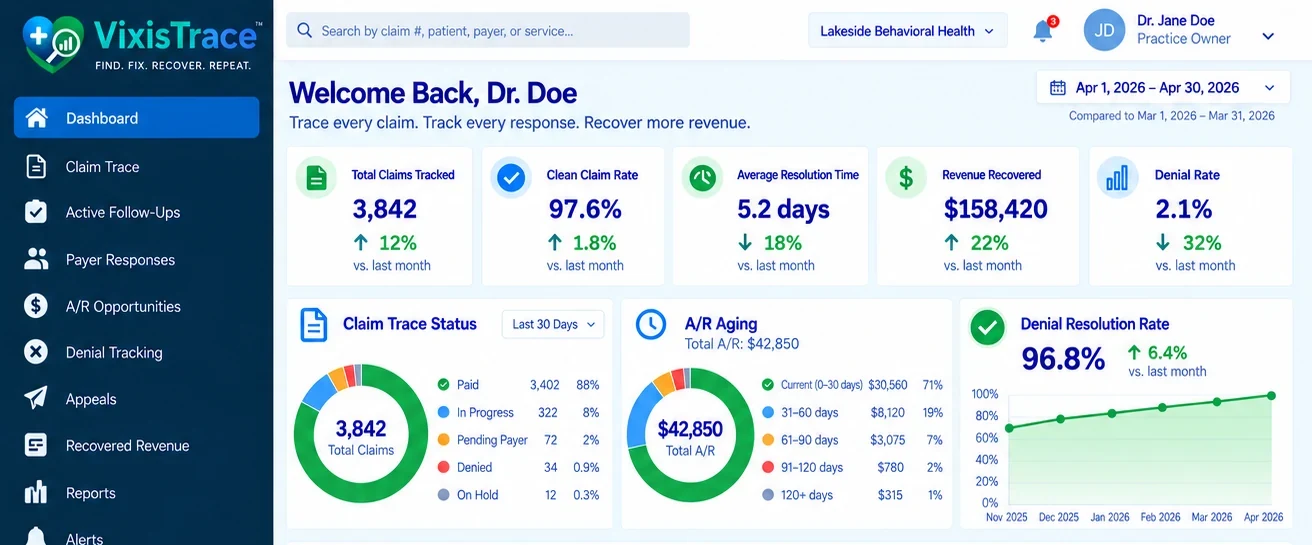
And the dashboard it lands in
What free actually means
See the Problem for Free.
VixisTrace™ Free is not a preview, a sample account or a blurred screenshot. You upload your own supported data and you see the analysis it produces.
Everything the analysis found
- Denied claims
- Rejected claims
- Denial reasons reported by the payer
- Payer patterns
- Claim status
- Revenue attached to the affected claims
- Top denial categories
- Aging information where the data supports it
- Trends where the data supports it
Free is view-only
The controls that WORK a claim are part of VixisTrace™ Pro. They are visible in Free rather than hidden, and clearly marked, so you always know what the product can do and what you are choosing between.
- Start or edit a root cause analysisPro
- Work or assign a claimPro
- Record corrective actionsPro
- Track resolution activityPro
- Add workflow notes and statusPro
- Mark claims resolvedPro
This is what happens in VixisTrace™ when you reach for one of them. Try it:
Pro
No account required to look. Nothing is submitted.
The decision
You Found the Problem. Now Decide What You Want to Do About It.
Both of these are real answers. A practice that wants to run its own revenue cycle should take the first one, and CareVixis will not treat that as a failed sale.
Option 1
Fix it myself
VixisTrace™ Pro, $49.95 a month
For practices that want the tools to investigate and work their own revenue cycle issues. Month to month, cancel anytime.
Fix It MyselfOption 2
Handle it for me
CareVixis revenue cycle management
For practices that would rather hand the work over. Our team investigates, works the claims, follows up with payers and tracks them through resolution.
Handle It for MeVixisTrace™ Free stays available either way, and you can stay on it for as long as you like.
See it. Work it. We handle it.
Three Levels, and the Only Difference Is Who Does the Work
VixisTrace™ Free
$0
No credit card.
See your revenue cycle data and the issues it identifies.
- View denials
- View rejections
- View payer patterns
- View revenue requiring attention
- View claim issues and status
- View the supported analytics
- Workflow actionsPro
VixisTrace™ Pro
$49.95/month
Month to month. Cancel anytime.
Everything in Free, plus the tools to investigate and manage the issues yourself.
- Root cause analysis
- RCA documentation
- Claim workflow
- Corrective-action tracking
- Resolution tracking
- Claim notes and activity
- Workflow and status management
- Reporting and export where supported
CareVixis Revenue Cycle Management
6% of insurance collections
7% with VixisConnect™, 8% with VixisConnect™ and VixisGrowth™. Nothing on patient payments. See pricing.
CareVixis becomes the team doing the revenue cycle work. VixisTrace™ is already included.
- Claim monitoring
- Denial management
- Rejection management
- Root cause analysis by our team
- Corrective-action follow-up
- Payer follow-up
- Accounts receivable management
- Resolution tracking
- VixisTrace™ visibility for your practice
Don't Pay Us to Find Out if VixisTrace™ Is Useful.
Upload your data. See what VixisTrace™ finds. Explore your results. Then decide.
If you want to work the issues yourself, unlock VixisTrace™ Pro for $49.95 a month. If you would rather someone else did the revenue cycle work, talk with CareVixis. If neither, keep using the free analysis.
$0 to see it. $49.95 a month to work it yourself. CareVixis revenue cycle management when you want us to handle it.
Getting started
Your Data Deserves More Than a Checkbox.
Before you upload claim information containing protected health information, we walk you through a short account setup and an electronic Business Associate Agreement. It is the agreement that makes handling your data lawful, so it comes first.
Create your free account
Name, work email and a password. No card.
Practice information
The practice, its address and the NPI or tax identification you bill under.
Authorized representative
The person permitted to sign agreements for the practice.
- The gate
Business Associate Agreement and required terms
Read and accept the BAA. Nothing below this step is available until it is signed.
- The gate
Electronic signature
Sign electronically. You receive a copy for your records.
Account enabled for PHI
Only now can protected health information be uploaded.
Upload your ERA, EOB and remittance data
Securely import the supported files.
VixisTrace™ analyses it
The claims are grouped, the reasons read and the patterns surfaced.
Your results
The complete analysis, free and view-only.
What is claim root cause analysis?
Claim root cause analysis (RCA) is the process of investigating why a healthcare claim was rejected, denied, underpaid or otherwise failed to produce the expected result, with the goal of identifying the underlying cause rather than only correcting the immediate claim.
VixisTrace™ is the CareVixis claim root cause analysis technology. It investigates an individual problem claim, identifies the cause from the evidence available for that claim, and supports corrective action and recurrence monitoring. It is not an EHR, a clearinghouse or a claim scrubber, and it does not replace one.
Previously published as RejectZero
VixisTrace™ is the current name for the claim root cause analysis technology CareVixis published as RejectZero™. It is the same work under its current name, and its scope now covers denied and underpaid claims alongside rejections. The former URL redirects here.
Fix the Claim, or Fix the Cause
Both are necessary. Only one of them changes next month. Most billing processes stop after the first.
Fixing the claim
- The error on the claim is identified.
- The claim is corrected.
- The claim is resubmitted or appealed.
- The claim is paid, or it is written off.
- The case is closed.
- The step that produced the error is unchanged.
Fixing the cause
- The error on the claim is identified.
- The cause is investigated, not assumed.
- The claim is corrected and resubmitted.
- The cause is categorized and recorded.
- Corrective action is directed at the step that produced it.
- Recurrence is monitored, so it is possible to tell whether the correction worked.
A practice can work denials competently for years and still see the same denial every month. That is not a failure of effort. It is what happens when nothing in the process is responsible for asking why.
What Happens to a Problem Claim
A conceptual view of the path a problem claim takes. Individual cases differ, and not every claim needs every step.
- A claim issue appearsA rejection, a denial, an underpayment, or a payment that does not match what was expected.
- VixisTrace™ investigatesThe claim, the remittance information, the reason codes and the supporting history are examined together.
- Root cause identifiedThe cause is determined from the available evidence and categorized. Where the evidence does not support a conclusion, that is recorded too.
- Corrective actionThe claim is corrected, resubmitted or appealed as appropriate, and the step that produced the problem is addressed where it can be.
- Resolution trackedWhat was done, when, by whom, and what the payer did in response.
- Findings used to reduce recurrenceThe finding goes to VixisIQ™, where repeat causes become visible as patterns rather than as separate incidents.
The eight stages
The workflow above is what a practice sees. These are the stages CareVixis works internally, in this order.
| Stage | What happens |
|---|---|
| 1. Detect | The problem claim is identified, from remittance information, claim status or reconciliation rather than from a complaint. |
| 2. Investigate | The evidence is gathered: the claim as submitted, the payer's response, the reason codes, eligibility and authorization history, and the account. |
| 3. Identify | The cause is determined and categorized. An unsupported conclusion is not recorded as a cause. |
| 4. Correct | What can be corrected on this claim is corrected. |
| 5. Prevent | Where the cause sits in a step that can be changed, corrective action is directed there. |
| 6. Resubmit | The claim is resubmitted or appealed through the appropriate route for that payer. |
| 7. Verify | The outcome is confirmed against the payer's response, not assumed from the resubmission. |
| 8. Monitor | Recurrence is watched, so the practice can tell whether the corrective action actually changed anything. |
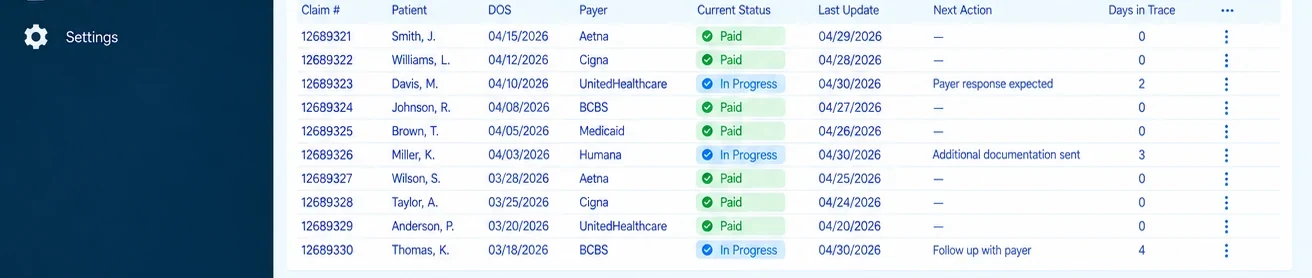
What it looks like
Where a practice sees the work: what is being traced, what each payer did, what is outstanding and what happens next.
What a Root Cause Can Turn Out to Be
These are the categories VixisTrace™ works with. Which one applies is a question of evidence for each claim, and several can be true at once.
| Category | What it means | Evidence usually examined |
|---|---|---|
| Eligibility | Coverage was not active, or not active for that date of service. | Eligibility response history against the date of service. |
| Coverage | The plan does not cover the service, or covers it differently than expected. | Benefit detail, plan type, the payer's published policy. |
| Authorization | An authorization was required and was missing, expired or did not match what was performed. | Authorization record, units and dates, service actually rendered. |
| Credentialing | The rendering provider was not credentialed with that payer for that date. | Credentialing effective dates by payer and provider. |
| Enrollment | Payer enrollment, including electronic transaction enrollment, was incomplete. | Enrollment records and payer confirmations. |
| Payer configuration | How the payer has the practice, group or provider set up on its side. | Payer records, remittance patterns across the same provider. |
| Coordination of benefits | Primary and secondary order was wrong or unknown to the payer. | Other coverage on file, primary payer remittance. |
| Timely filing | The claim reached the payer after its filing limit. | Submission and receipt dates against that payer's limit. |
| Duplicate claim | The payer treated the claim as already received. | Submission history, prior remittance, resubmission trail. |
| Documentation | The record does not support what was billed, or was not supplied when requested. | The documentation, the request, what was sent and when. |
| Medical necessity | The payer determined the service was not medically necessary under its policy. | The payer's coverage policy, diagnosis and documentation. |
| Coding | The codes submitted did not match the service, or conflicted with each other. | The codes billed, the record, applicable coding guidance. |
| Modifier | A required modifier was missing, or one was used incorrectly. | Service detail, payer modifier requirements. |
| Place of service | The place of service reported did not match the service or the payer's expectation. | Where the service occurred, including telehealth detail. |
| Demographics | Patient identifiers did not match the payer's record. | Name, date of birth, member identifier as submitted versus on file. |
| Provider information | Provider identifiers, taxonomy or the billing and rendering relationship were wrong. | Identifiers as submitted versus enrollment records. |
| Contractual or payment issue | The claim processed, but not at the contracted rate. | The contract or fee schedule against what was actually paid. |
| Clearinghouse rejection | The claim never reached the payer, having failed at the clearinghouse or the payer front end. | The rejection message, the file as transmitted. |
| Payer processing | The payer processed the claim incorrectly against its own policy. | The remittance, the policy, the outcome after the payer reviewed it again. |
| Other administrative | A cause that does not fit the categories above and is recorded as what it is. | Whatever the case requires. |
What this page does not say
CareVixis does not claim that denials are usually caused by the provider, the biller, the coder, the EHR, the clearinghouse or the payer. Any of those can be the cause, and so can a combination. VixisTrace™ determines the cause from the evidence available for the individual claim.
CareVixis also publishes no figures on this page: no denial rate, no recovery rate, no resolution time and no distribution of root causes. When CareVixis has enough anonymized, aggregated data to report those honestly, it will publish them with the methodology, the sample size, the period and the limitations stated.
A Rejection Is Not a Denial
They get used interchangeably, including by software. They have different causes and different remedies, and treating them as one thing hides both.
Rejection
- Fails before adjudication.
- Stopped at the clearinghouse or the payer front end.
- Usually a format, identifier or data problem.
- Was never processed as a claim, so there is no payer decision to appeal.
- Remedy: correct and resubmit. Filing limits still run.
Denial
- Happens after adjudication.
- A decision the payer made about a claim it processed.
- Reported with claim adjustment reason codes and remark codes.
- There is a decision on record, so appeal rights generally apply.
- Remedy: depends entirely on why, which is the point of the investigation.
Reading the payer's own explanation
A payer explains its decision in code. X12 states that claim adjustment reason codes "describe why a claim or service line was paid differently than it was billed".[1] The two character group code that precedes the number assigns responsibility for the adjustment: CO for contractual obligation, PR for patient responsibility, OA for other adjustment, PI for a payer initiated reduction, CR for corrections and reversals.
Remittance advice remark codes add the detail. X12 states they "are used to provide additional explanation for an adjustment already described by a Claim Adjustment Reason Code (CARC) or to convey information about remittance processing".[2] Informational remark codes, called Alerts, "convey information about remittance processing and are never related to a specific adjustment or CARC".[2]
A reason code says what the payer did. It does not say why it happened inside your practice. That distance between the code and the cause is the work.
What You Should Be Able to Ask, and Get Answered
If CareVixis is responsible for a claim, CareVixis can tell you where it stands. These four answers are the commitment, and they do not depend on which systems a practice runs.
Where it is
The claim's current status, and with whom.
What happened
What the payer did, and what the evidence shows about why.
What we did
The action taken, when, and by whom.
What happens next
The next step, who owns it and when it is due.
On prevention, the honest version: CareVixis does not promise that rejections or denials will be prevented. The objective is continuous improvement: identify preventable patterns, address their causes, and reduce unnecessary repeat failures. Some denials are correct. Some are outside anyone's control. Saying otherwise would not survive the first month.
VixisTrace™ Finds the Cause. VixisIQ™ Reveals the Pattern.
A single investigation tells you what happened to one claim. That is worth having, and on its own it is not enough to change anything.
Every VixisTrace™ finding is recorded in a category, which means the findings can be counted. VixisIQ™, the CareVixis revenue intelligence technology, gathers them alongside the rest of the revenue-cycle data and shows whether the same cause keeps appearing, with which payer, for which provider, on which kind of claim.
One claim is an incident. A hundred is a process problem.
Where to Start, Depending on How You Bill Today
This page is what VixisTrace™ is and how it works. The pages below are the same technology, written for a particular starting point, so you can see it in the terms your own practice uses.
- Start free, whoever you areAccount setup and the Business Associate Agreement, which is executed before any data containing protected health information is uploaded. There is no route that permits upload first. Start VixisTrace™ free.
- If your practice bills out of TherapyNotesThe same analysis, shown in the terms a behavioral health practice reads on its own remittances. VixisTrace™ for TherapyNotes users.
- If you run a chiropractic practiceWritten around what actually decides whether an adjustment gets paid: the plan rather than the carrier, medical necessity in the record, the narrow scope of Medicare coverage and the modifier that carries the claim. No particular chiropractic software required. VixisTrace™ for chiropractic billing.
- When one claim turns out to be a patternFindings are recorded in categories, so they can be counted across payers, providers and claim types. VixisIQ™ revenue intelligence.
TherapyNotes is a trademark of its respective owner. CareVixis is not affiliated with, endorsed by, sponsored by or certified by TherapyNotes. No API integration, native integration, certification or partnership with TherapyNotes is claimed.
Questions Practices Ask Before They Start
Is VixisTrace™ really free?
Yes. VixisTrace™ Free costs $0 and requires no credit card. You upload your own supported remittance data and see the analysis it produces. It is not a trial that expires, a sample account or a blurred preview. The one limit is that Free is view-only: the controls that work a claim belong to VixisTrace™ Pro. Account setup and an executed Business Associate Agreement are required first, because claim data generally contains protected health information.
What can I see with VixisTrace™ Free?
Denied claims, rejected claims, the denial reasons the payer reported, payer patterns, claim status, the revenue attached to the affected claims, top denial categories, and aging and trend information where your data supports it. Nothing in the analysis is withheld, blurred or summarised to push an upgrade.
Why is the analysis free?
Because a practice should not have to buy a system to find out whether it has a problem. CareVixis would rather a practice discover what is happening in its own revenue cycle and then choose what to do about it. Some practices will work the issues themselves with Pro, some will ask CareVixis to handle the revenue cycle, and some will do neither. All three are acceptable outcomes.
What happens when I find a problem?
You decide who works it. VixisTrace™ Pro gives you the tools to investigate and resolve it yourself. CareVixis revenue cycle management puts our team on it instead. The analysis you already have does not change or disappear either way.
What does VixisTrace™ Pro unlock?
The ability to act on what the analysis found: root cause analysis and RCA documentation, claim workflow, corrective-action tracking, resolution tracking, claim notes and activity, workflow and status management, payer issue tracking, denial pattern analysis, historical trends, and reporting and export where supported.
Why does VixisTrace™ Pro cost $49.95 a month?
Pro is where the work happens, and the work is what carries ongoing cost: the workflow, the records of what was done to each claim, the tracking of corrective actions and the reporting built on top of them. Seeing the analysis is free because visibility is what tells you whether any of it is worth paying for.
Can CareVixis work the claims for me?
Yes. That is CareVixis revenue cycle management, and it is a service rather than a subscription. Our team monitors claims, manages denials and rejections, performs the root cause analysis, takes corrective action, follows up with payers, manages accounts receivable and tracks claims through to resolution.
Do I have to become a CareVixis revenue cycle management customer?
No. VixisTrace™ Free and VixisTrace™ Pro are standalone products, and a practice can use either one indefinitely without buying anything else from CareVixis. There is no requirement to take a consultation, a sales call or a quote to keep using them.
Do I have to change my EHR?
No. VixisTrace™ analyses the remittance data your existing systems already produce, so there is no migration and nothing to switch off. Keeping the EHR you already have carries no monthly software fee from CareVixis.
Do I have to change my clearinghouse?
No. The electronic remittance advice your clearinghouse already delivers is the input VixisTrace™ reads. Your claims keep going out the way they go out today.
Why do I need to sign a Business Associate Agreement?
Because claim and remittance data generally contains protected health information. Under HIPAA, a vendor handling protected health information on behalf of a practice is a business associate, and that relationship has to be documented in a Business Associate Agreement before the information changes hands. CareVixis executes the agreement during account setup, so it is in place before your first upload. There is no route that lets protected health information be uploaded first.
What information can I upload?
Supported electronic remittance advice, explanation of benefits and related claim and remittance information. These are the files that record what each payer did with each claim and why, which is what the analysis reads. Do not send claim data by email or through a contact form: it goes through the account, after the agreement is signed.
Can I cancel VixisTrace™ Pro?
Yes. Pro is month to month and can be cancelled at any time. Cancelling returns the account to VixisTrace™ Free, where the analysis stays visible and the workflow controls lock again.
What is the difference between VixisTrace™ and CareVixis revenue cycle management?
VixisTrace™ is technology you operate. CareVixis revenue cycle management is a service where our team operates it for you, alongside the rest of the revenue cycle. With Free you see the problems; with Pro you see them and work them yourself; with revenue cycle management you see them and CareVixis works them for you.
Questions Practices Ask About Claim Root Cause Analysis
What is the difference between fixing a claim and finding its root cause?
Fixing a claim corrects the error and resubmits it, which recovers that one claim. Finding the root cause establishes why the error occurred, which is what makes it possible to address the step that produced it. A practice can fix claims indefinitely without the underlying cause ever changing.
What is the difference between a claim rejection and a denial?
A rejection fails before adjudication, at the clearinghouse or the payer front end, usually for a format or data problem, and was never processed as a claim. A denial is a payer decision made after adjudication. They have different causes and different remedies, so VixisTrace™ does not treat them as the same thing.
Does VixisTrace™ prevent denials?
No. CareVixis does not promise that rejections or denials will be prevented. The objective is continuous improvement: identify preventable patterns, address their causes, and reduce unnecessary repeat failures. Some denials are correct, and some are outside anyone's control.
Did CareVixis invent root cause analysis?
No. Root cause analysis is a long established discipline used across many industries, and CareVixis is not the only billing or revenue management company that performs it. What is proprietary to CareVixis is the VixisTrace™ methodology, workflow, categorization, tracking, accountability model and recurrence monitoring.
Whose fault does VixisTrace™ usually find?
There is no usual answer, and CareVixis does not publish one. A cause can sit with eligibility, authorization, credentialing, coding, documentation, demographics, payer configuration, payer processing or the clearinghouse. VixisTrace™ determines the cause from the evidence available for that claim.
Is VixisTrace™ the same as RejectZero?
Yes. VixisTrace™ is the current name for the claim root cause analysis technology CareVixis previously published as RejectZero. The work is the same, and its scope now covers denied and underpaid claims alongside rejections.
Where does VixisTrace™ fit in the revenue cycle?
It runs where claims stop behaving as expected, which is after submission and around adjudication, posting and accounts receivable. It is not a claim scrubber and does not replace one. Scrubbing tries to catch problems before submission; VixisTrace™ works out why something got through and what to do about the step that let it.
Do I have to change my EHR or clearinghouse for this?
No. VixisTrace™ investigates claims and remittance information from the systems a practice already runs. See how CareVixis works alongside existing systems.
You Don't Have to Guess Where Your Revenue Is Getting Stuck.
Let VixisTrace™ analyse your data and show you.
No credit card required.
See it for free. Work it yourself with Pro. Or let CareVixis handle it.
Sources
- X12, Claim Adjustment Reason Codes. "These codes describe why a claim or service line was paid differently than it was billed." Group codes: CO contractual obligation, CR corrections and reversal, OA other adjustment, PI payer initiated reduction, PR patient responsibility. x12.org. Accessed 18 September 2026.
- X12, Remittance Advice Remark Codes. "Remittance Advice Remark Codes (RARCs) are used to provide additional explanation for an adjustment already described by a Claim Adjustment Reason Code (CARC) or to convey information about remittance processing." Informational RARCs, called Alerts, "convey information about remittance processing and are never related to a specific adjustment or CARC." x12.org. Accessed 18 September 2026.
- Centers for Medicare & Medicaid Services, Transactions (HIPAA Administrative Simplification), for the adopted standards referenced on this page. cms.gov. Accessed 18 September 2026.
These sources describe the code sets and standards the industry uses. They are not CareVixis results and they make no claim about CareVixis performance.
From Revenue Signal to Root Cause
VixisIQ™ helps surface the revenue signal. VixisTrace™ follows the affected claim through investigation, root-cause analysis and resolution so the team can address why the problem occurred, not simply resubmit it.