


From Paper to Posted — In Minutes
Scan your EOBs and let VixisEOB™ read the data, match it to the claim and post it back to your EMR where a tested integration supports it. You also get a clean Excel file for review, reporting or audit.
-
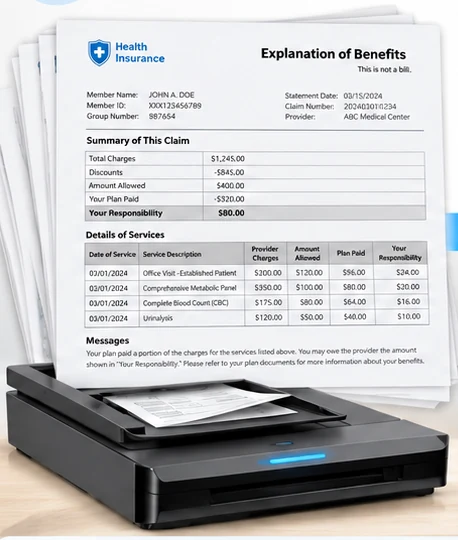
Scan EOB Documents
Scan a stack of EOBs, on paper or as a PDF.
-
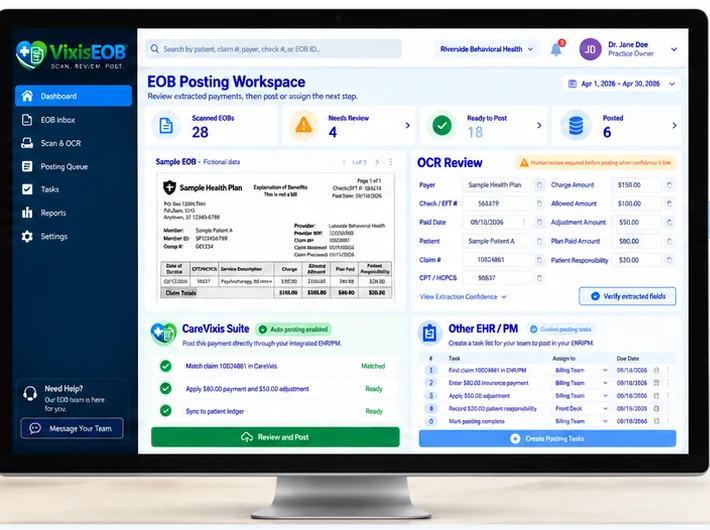
VixisEOB Extracts & Processes
VixisEOB™ reads the document, matches it to the claim, validates it and prepares it for posting.
-
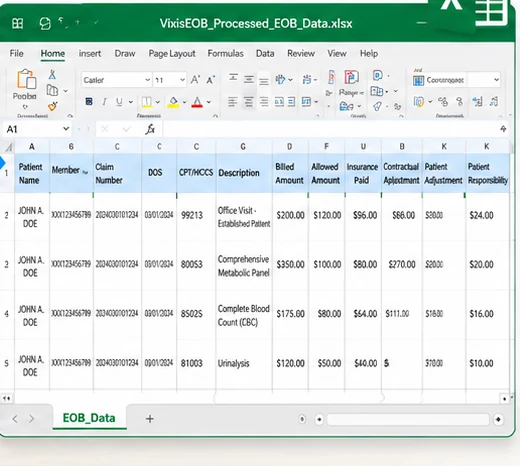
Clean Excel Output
A structured Excel file for review, reporting or audit, alongside the posting workflow.
- ScanScan or upload EOB documents, as PDF, TIFF or paper.
- ExtractThe payer, patient, claim, service lines, payments, adjustments and reason codes are read off the document.
- MatchThe extracted data is matched to the correct patient and claim.
- ValidateAmounts, codes and payer rules are checked, and a confidence threshold decides what a person needs to see.
- Auto-PostWhere a tested EMR integration supports it, approved payments and adjustments post back for you.
- Excel OutputA clean, structured Excel file for review, reporting or audit.
Interface illustration. All data shown is sample data for representational purposes only, as the workspace itself states. The patient, the payer, the practice, the claim numbers and every amount are illustrative: not a client account, not real patient data, and not a real payer.