Technology
When Something Stops Working,You Should Not Have to Work Out Which Vendor to Call.
EHRs, integrations, vendors, security and the systems that do not talk to each other should not be your second job.
CareVixis supports the technology your practice already runs on, connects the pieces that do not fit, and builds what is missing.
- U.S.-Based
- Zero Outsourcing
- 24/7 Support
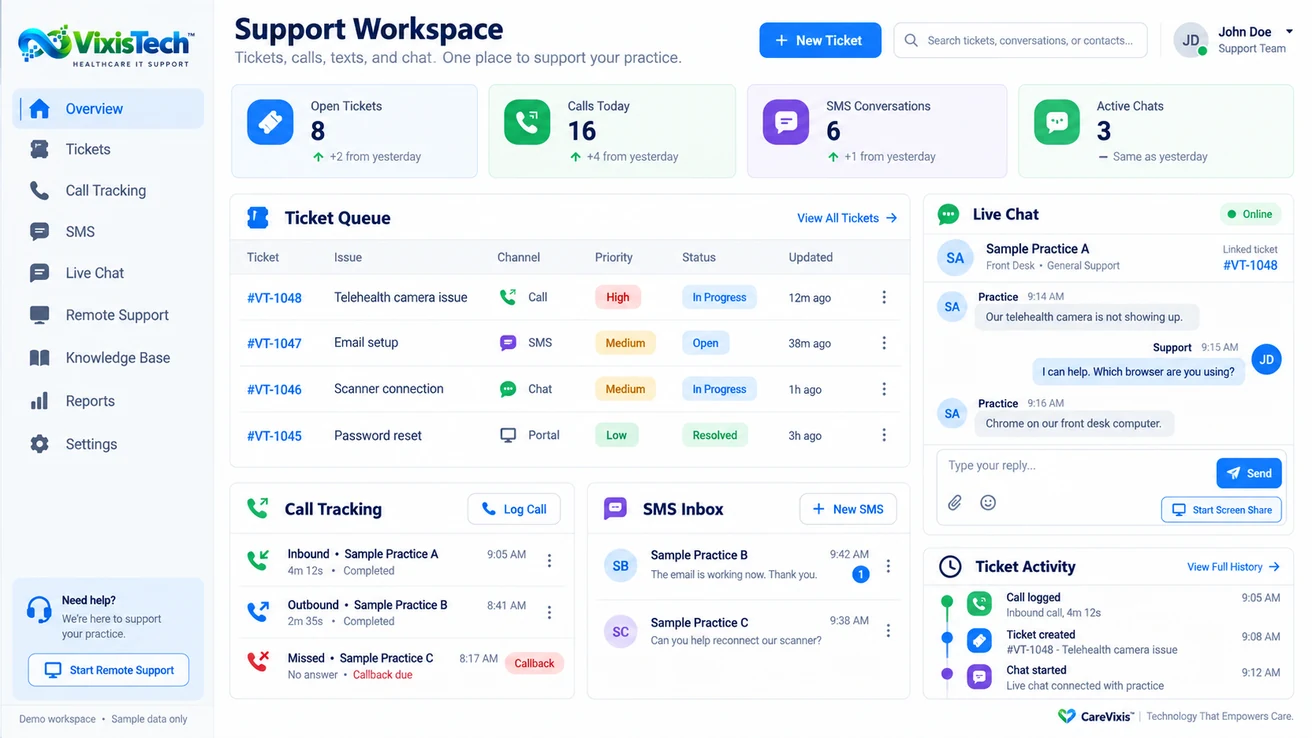
Swipe the screen to see the whole workspace.
You Did Not Start a Practice to Run an IT Department.
Who do I call for this?
The EHR blames the clearinghouse, the clearinghouse blames the internet, and you are the one holding the phone.
Why will these two not talk?
Two systems you already pay for, and somebody on your staff is still retyping between them.
How many vendors is this now?
Separate logins, separate contracts, separate support lines, and no single person who owns the outcome.
Is any of this actually secure?
You are responsible for protecting patient information, and most of the systems holding it were chosen one at a time.
Why is it down again?
The scanner, the phones, the portal. Small failures that stop a clinic day and nobody is tracking the pattern.
That is why we built VixisTech™, and why a U.S.-based team answers it.

One Place to Ask. One Team That Owns the Answer.
VixisTech™ is the CareVixis healthcare IT support desk. Your staff raises it once, however is easiest for them, and it is tracked through to resolved rather than handed back to you to chase.
Raise it any way you like
Call, text, chat or the portal. It becomes the same ticket either way.
A queue you can see
What is open, what is in progress, what is resolved, what changed and when.
Calls that do not get lost
Inbound, outbound and missed, with callbacks tracked rather than remembered.
Remote support
Someone can connect and look at the machine instead of describing the fix down a phone.
Answers you can reuse
A knowledge base, so the second person with the same problem does not start over.
Reporting on what keeps breaking
Patterns across tickets, so recurring problems get fixed at the cause rather than reopened.
Practice technology support → Works with your systems → What it costs →
A Ticket System Does Not Fix a Scanner. People Do.
The workspace is how the work is tracked. What actually resolves it is a U.S.-based CareVixis team that takes the problem, deals with whichever vendor owns it, and stays with it until your staff can work again.
- Tell Us Once
- We Take It
- We Deal With the Vendor
- Working Again
- U.S.-Based
- Zero Outsourcing
- 24/7 Support
It Stays Your Practice.
Anything we build, brand or run for you carries your practice’s name and look. Your patients see you, not us. And keeping the systems you already have is a supported outcome, not a fallback: if they work, we support them where they are.
The conversation does not start with
What should we replace?It starts with
What is getting in your way today?And When the Right Answer Does Not Exist Yet, We Build It.
Some of what CareVixis runs today started as one practice asking for something that was not available anywhere. What we can take on:
- Support for your EHR and practice management system
- Integrations between systems you already have
- Practice-branded patient portals
- Phone and email built for healthcare
- Automation for steps your staff repeats by hand
- Reporting that answers your questions
- Custom development when nothing off the shelf fits
- One team accountable for all of it
Integration and custom work is scoped to the problem and approved before anything begins, so you always know what is being built and what it involves. On security and compliance, CareVixis designs and operates its services around HIPAA and related requirements, and supports your practice in meeting its own obligations. We do not perform external certifications or independent third-party assessments, and HIPAA has no certification to hold.
You Should Not Be the One Holding It All Together.
You take care of your patients. Let CareVixis take care of the technology your practice runs on.
- U.S.-Based
- Zero Outsourcing
- 24/7 Support
The chat window did not open. Use the button above to tell us what you need help with, or the chat launcher at the bottom right of the page.